Appearance
Attribute Nodes
Attribute nodes read and write per-point data — both built-in point properties (Density, Position, Rotation, Scale, Color, Steepness, Seed) and arbitrary named metadata attributes. All nodes in this category use the green node color (#80B24D).
Attribute Noise
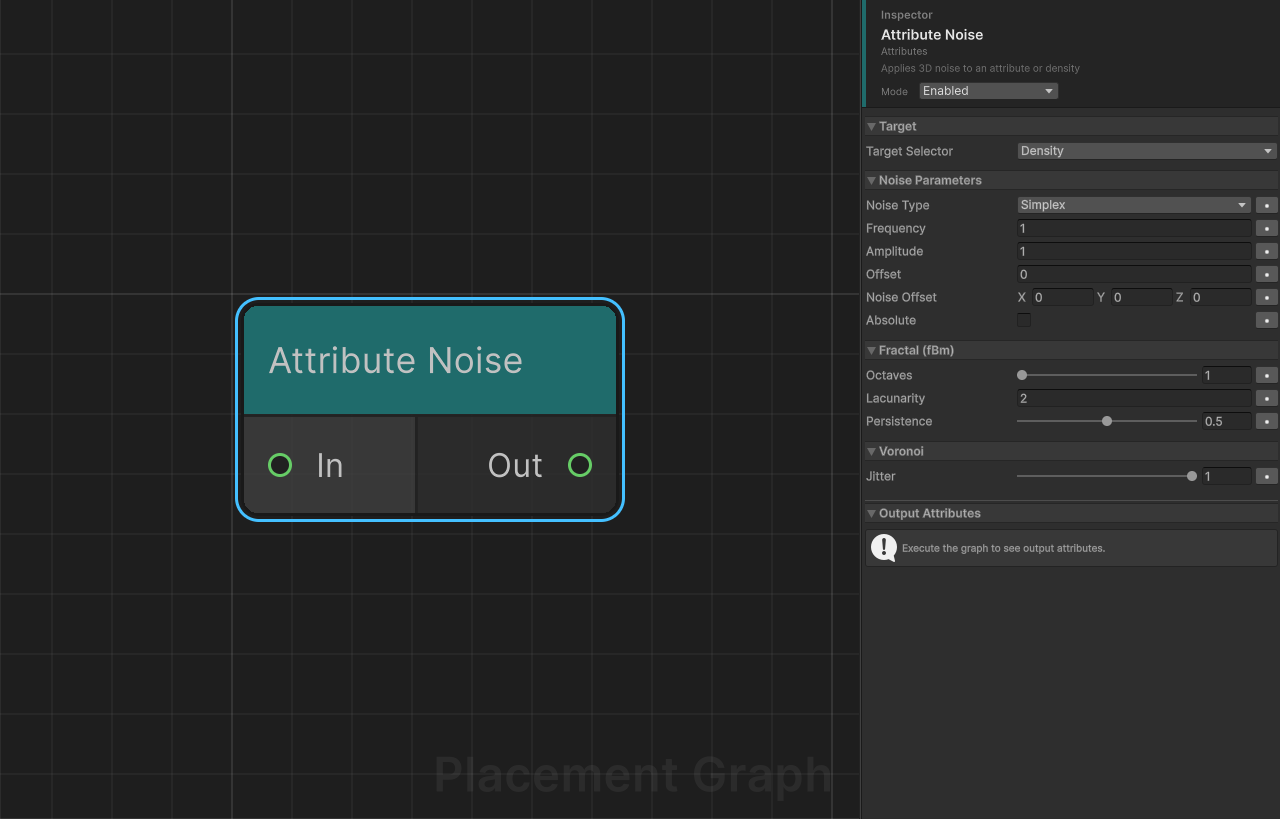
Category: Attributes
Description: Applies 3D noise to an attribute or density.
Seed-sensitive: No (noise is purely position-based)
Samples a procedural noise function at each point's world position and writes the result to a chosen attribute. Supports fractal layering (fBm) via octave stacking.
Ports
| Direction | Name | Type |
|---|---|---|
| Input | In | Point |
| Output | Out | Point |
Settings
Target
| Field | Type | Default | Description |
|---|---|---|---|
targetSelector | PPGAttributeSelector | Density | Attribute to write the noise result to. Accepts built-in properties or a custom attribute name. |
Noise Parameters
| Field | Type | Default | Description |
|---|---|---|---|
noiseType | PPGNoiseType | Simplex | Noise algorithm. Options: Simplex, Perlin, VoronoiF1, VoronoiF2, VoronoiEdge. |
frequency | float | 1.0 | Spatial frequency of the noise field. |
amplitude | float | 1.0 | Multiplier applied to the final noise value. |
offset | float | 0.0 | Constant bias added to the noise result after amplitude scaling. |
noiseOffset | Vector3 | (0, 0, 0) | World-space translation applied to the sampling position before lookup. |
absolute | bool | false | If enabled, takes the absolute value of the noise result (abs(n)). |
Fractal (fBm)
| Field | Type | Range | Default | Description |
|---|---|---|---|---|
octaves | int | 1 – 8 | 1 | Number of noise layers. 1 = no fractal; higher values add fine detail. |
lacunarity | float | — | 2.0 | Frequency multiplier between successive octaves. |
persistence | float | 0 – 1 | 0.5 | Amplitude multiplier between successive octaves. Values below 1 reduce contribution of higher octaves. |
Voronoi
| Field | Type | Range | Default | Description |
|---|---|---|---|---|
jitter | float | 0 – 1 | 1.0 | Cell randomness. 0 produces a regular grid; 1 fully randomises cell positions. Only affects Voronoi noise types. |
Provided Attributes
When targetSelector points to a custom attribute, the node declares it as a Float attribute via IPPGAttributeProvider.
Tips
- The node is executed using the Unity Job System (
IPPGJobElement). Up to 64 points are scheduled per batch for efficient parallel processing. - When writing to the built-in
Densityproperty, the job writes directly intoPPGPoint.densityon the worker thread. For custom attributes the value is written on the main thread after job completion. - Combining Simplex noise with
octaves = 4,lacunarity = 2, andpersistence = 0.5produces classic fBm terrain-style variation.
Attribute Remap
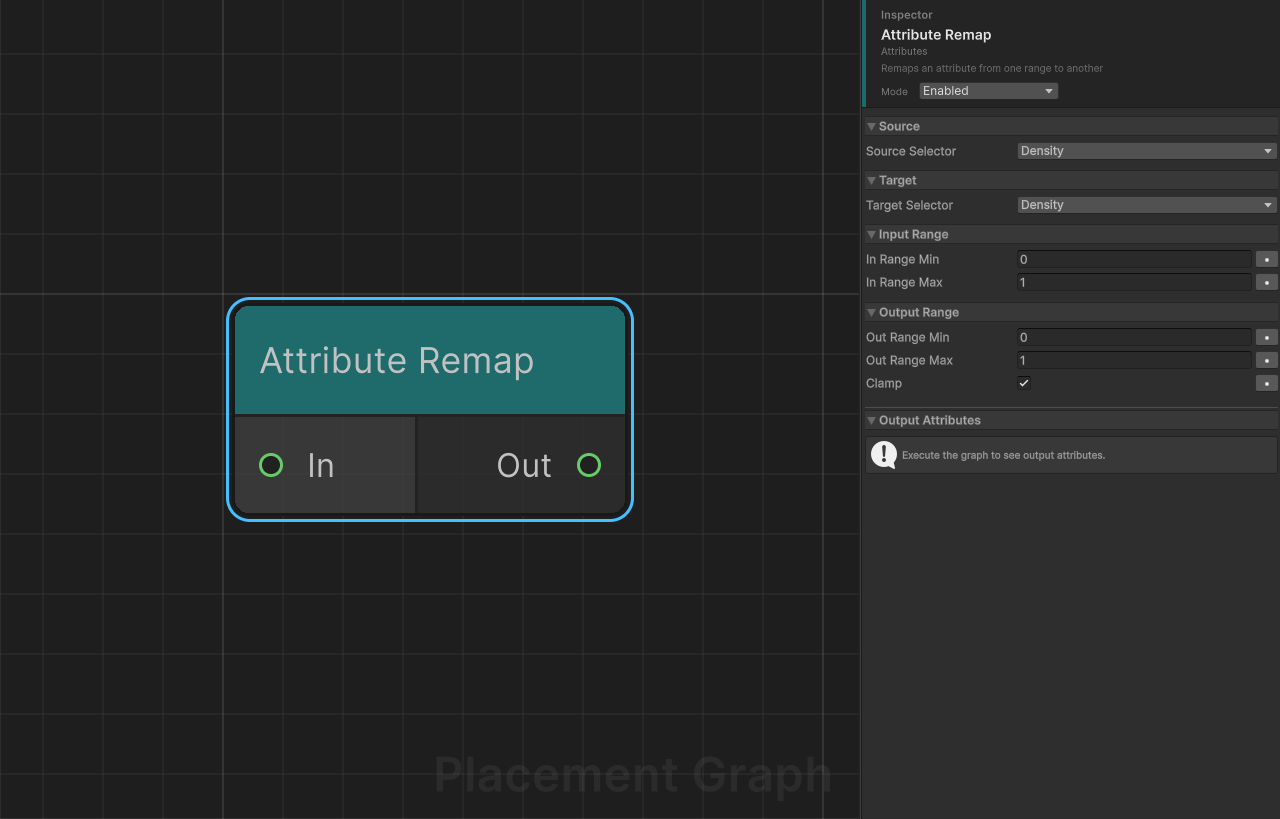
Category: Attributes
Description: Remaps an attribute value from one numeric range to another.
Reads a float value from sourceSelector, linearly remaps it from [inRangeMin, inRangeMax] to [outRangeMin, outRangeMax], and writes the result to targetSelector. The source and target can be the same attribute for in-place remapping.
Ports
| Direction | Name | Type |
|---|---|---|
| Input | In | Point |
| Output | Out | Point |
Settings
Source
| Field | Type | Default | Description |
|---|---|---|---|
sourceSelector | PPGAttributeSelector | Density | Attribute to read the source value from. |
Target
| Field | Type | Default | Description |
|---|---|---|---|
targetSelector | PPGAttributeSelector | Density | Attribute to write the remapped result to (Write mode selector). |
Input Range
| Field | Type | Default | Description |
|---|---|---|---|
inRangeMin | float | 0.0 | Minimum of the expected input range. |
inRangeMax | float | 1.0 | Maximum of the expected input range. |
Output Range
| Field | Type | Default | Description |
|---|---|---|---|
outRangeMin | float | 0.0 | Minimum of the target output range. |
outRangeMax | float | 1.0 | Maximum of the target output range. |
clamp | bool | true | When enabled, clamps the result to [min(outRangeMin, outRangeMax), max(outRangeMin, outRangeMax)]. Handles inverted ranges correctly. |
Provided / Consumed Attributes
- Provides: If
targetSelectoris a custom attribute, declares it asFloat(IPPGAttributeProvider). - Consumes: If
sourceSelectoris a custom attribute, declares it as consumed (IPPGAttributeConsumer).
Tips
- Setting
outRangeMin > outRangeMaxinverts the value. The clamp step handles the reversed bounds automatically. - Source and target selectors may reference the same attribute for an in-place remap.
- If
inRangeMin == inRangeMaxthe node outputs0to avoid a division-by-zero.
Attribute to Color
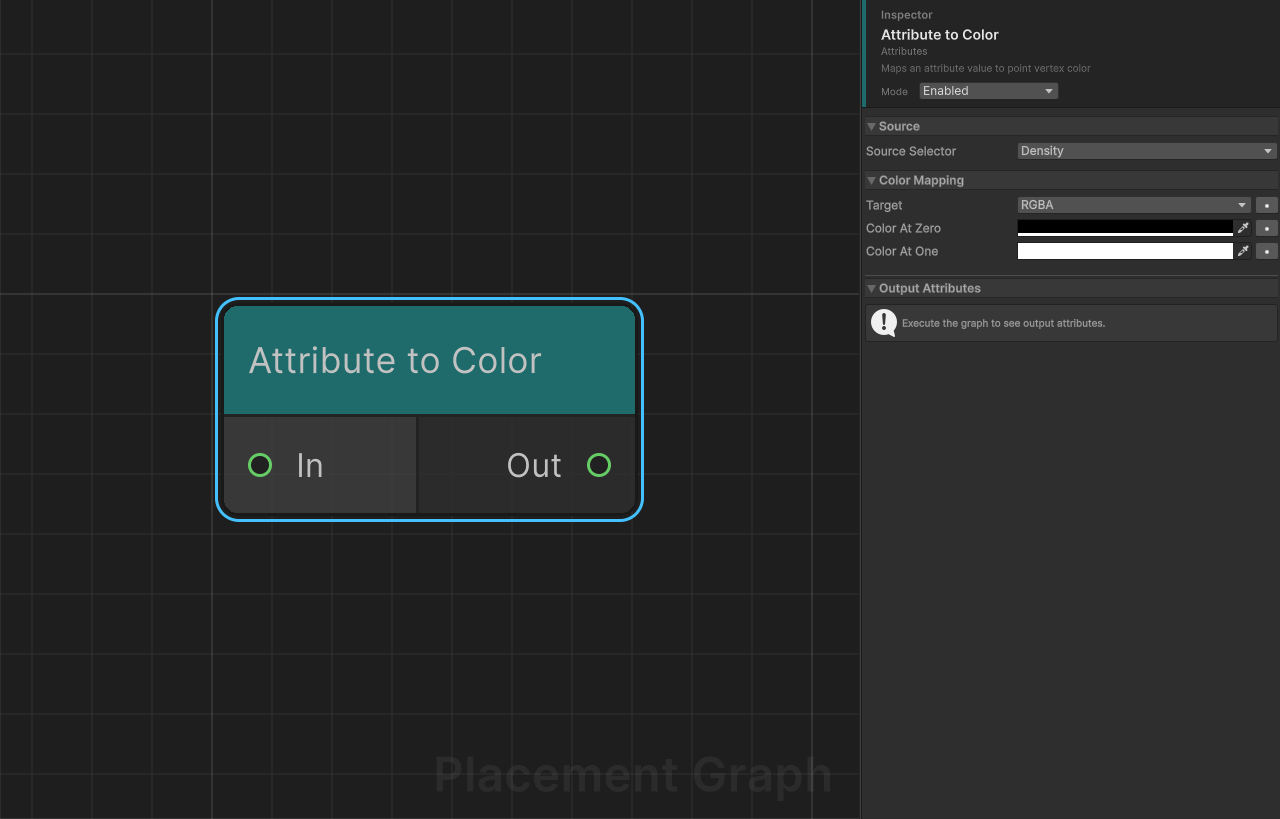
Category: Attributes
Description: Maps an attribute value to the point's vertex color.
Reads a float value from sourceSelector (clamped to [0, 1]) and writes it to the point's color field. Useful for driving vertex colors on GPU instanced meshes or for passing data to MaterialPropertyBlock overrides via instancer nodes.
Ports
| Direction | Name | Type |
|---|---|---|
| Input | In | Point |
| Output | Out | Point |
Settings
Source
| Field | Type | Default | Description |
|---|---|---|---|
sourceSelector | PPGAttributeSelector | Density | Attribute supplying the [0, 1] driving value. |
Color Mapping
| Field | Type | Default | Description |
|---|---|---|---|
target | ColorTarget | RGBA | Which channel(s) to write. See table below. |
colorAtZero | Color | Color.black | Full RGBA color written when the attribute equals 0. Used only in RGBA mode. |
colorAtOne | Color | Color.white | Full RGBA color written when the attribute equals 1. Used only in RGBA mode. |
ColorTarget enum
| Value | Behaviour |
|---|---|
RGBA | Lerps from colorAtZero to colorAtOne and writes all four channels. |
R | Writes the attribute value directly to the R channel only. |
G | Writes to the G channel only. |
B | Writes to the B channel only. |
A | Writes to the A channel only. |
Consumed Attributes
If sourceSelector is a custom attribute, declares it as consumed (IPPGAttributeConsumer).
Tips
- In single-channel modes (
R/G/B/A) thecolorAtZeroandcolorAtOnefields are ignored; the raw attribute value is written as-is. - The color is clamped to
[0, 1]viamath.saturatebefore any mapping. - Point colors can be picked up by the Prefab Instancer or Weighted Instancer nodes through
PPGMaterialPropertyMappingto drive shader parameters per instance.
Attribute to Transform
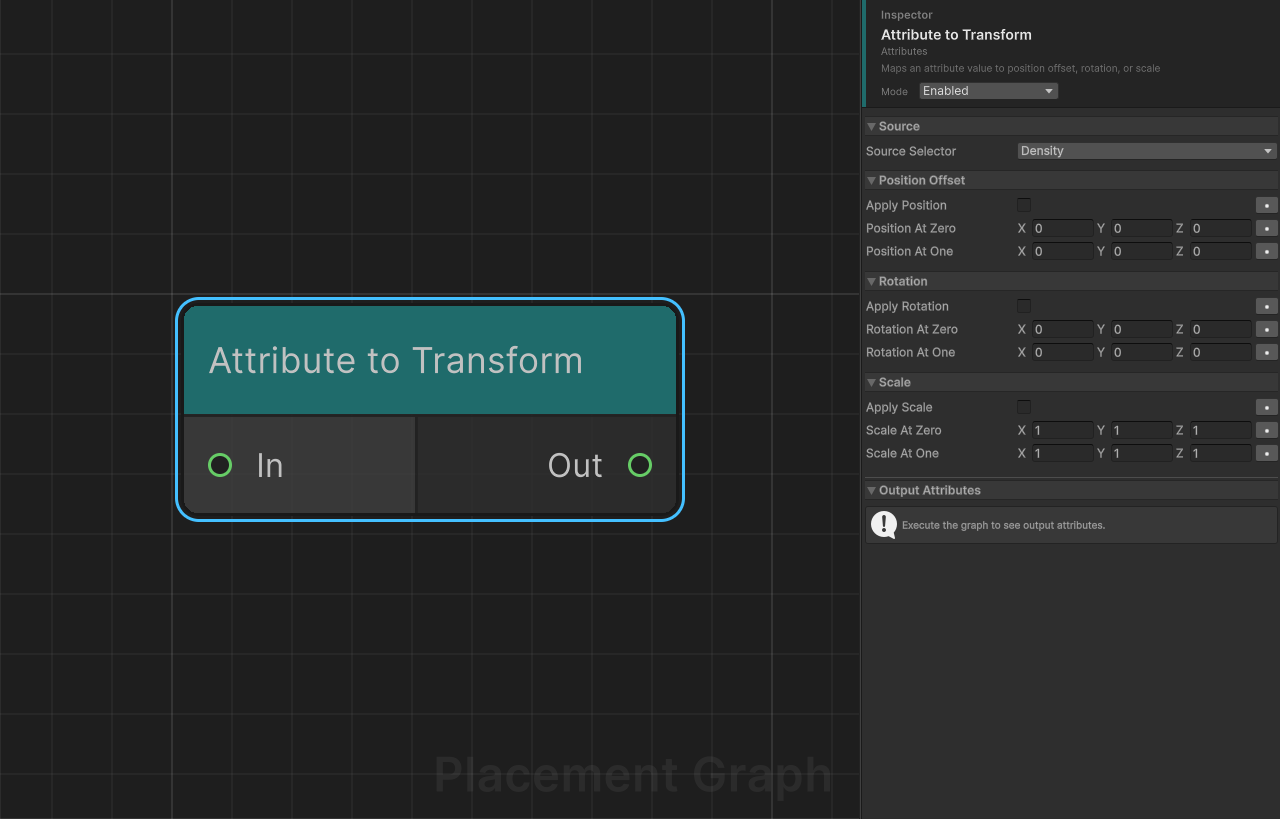
Category: Attributes
Description: Maps an attribute value to position offset, rotation, or scale.
Reads a float value from sourceSelector (clamped to [0, 1]) and linearly interpolates transform components between an "at zero" and "at one" value, multiplying the result into each point's transform matrix.
Ports
| Direction | Name | Type |
|---|---|---|
| Input | In | Point |
| Output | Out | Point |
Settings
Source
| Field | Type | Default | Description |
|---|---|---|---|
sourceSelector | PPGAttributeSelector | Density | Attribute that drives the interpolation t. |
Position Offset
| Field | Type | Default | Description |
|---|---|---|---|
applyPosition | bool | false | Enable position offset driven by the attribute. |
positionAtZero | Vector3 | (0, 0, 0) | Local position offset when the attribute equals 0. |
positionAtOne | Vector3 | (0, 0, 0) | Local position offset when the attribute equals 1. |
Rotation
| Field | Type | Default | Description |
|---|---|---|---|
applyRotation | bool | false | Enable rotation driven by the attribute. |
rotationAtZero | Vector3 | (0, 0, 0) | Euler rotation in degrees applied when the attribute equals 0. |
rotationAtOne | Vector3 | (0, 0, 0) | Euler rotation in degrees applied when the attribute equals 1. |
Scale
| Field | Type | Default | Description |
|---|---|---|---|
applyScale | bool | false | Enable scale driven by the attribute. |
scaleAtZero | Vector3 | (1, 1, 1) | Scale multiplier applied when the attribute equals 0. |
scaleAtOne | Vector3 | (1, 1, 1) | Scale multiplier applied when the attribute equals 1. |
Consumed Attributes
If sourceSelector is a custom attribute, declares it as consumed (IPPGAttributeConsumer).
Tips
- Transforms are applied in the order: position → rotation → scale, each multiplied into the point's existing
float4x4transform matrix usingmath.mul. - Rotation is converted from Euler degrees (ZXY order) to a quaternion internally.
- Only the enabled channels are processed; disabling all three makes the node a passthrough.
- Useful for attribute-driven height offsets, random lean angles, or density-scaled vegetation.
Create Attribute
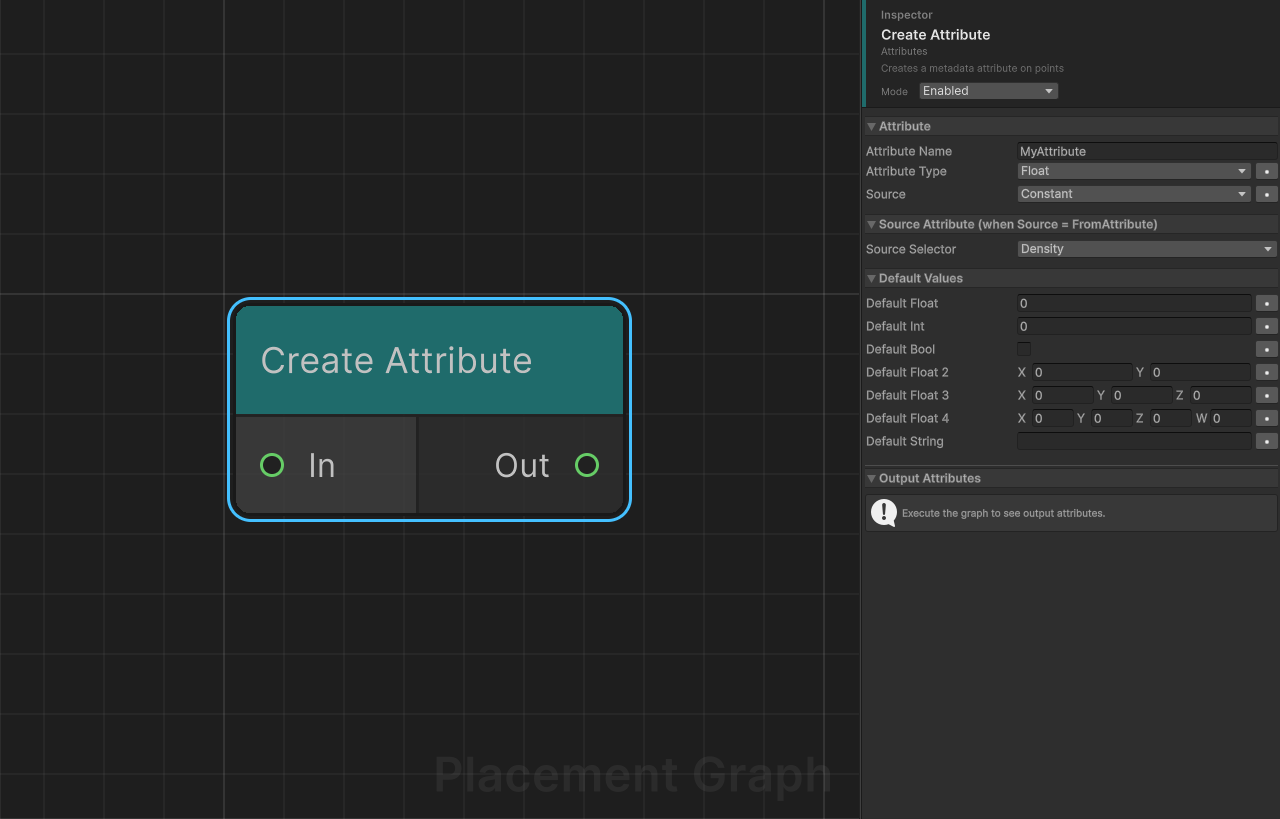
Category: Attributes
Description: Creates a named metadata attribute on points and populates it with a constant, a random value, or the value of another attribute.
Ports
| Direction | Name | Type |
|---|---|---|
| Input | In | Point |
| Output | Out | Point |
Settings
Attribute
| Field | Type | Default | Description |
|---|---|---|---|
attributeName | string | "MyAttribute" | Name of the attribute to create. Must not be empty. Built-in property names (e.g. "Density") are also accepted and write directly to the corresponding PPGPoint field. |
attributeType | PPGAttributeType | Float | Data type for the new attribute. See type table below. |
source | SourceMode | Constant | How the value is determined: Constant, FromAttribute, or Random. |
Supported Attribute Types
PPGAttributeType | C# type / components |
|---|---|
Float | float |
Int | int |
Bool | bool |
Float2 | float2 (2 components) |
Float3 | float3 (3 components) |
Float4 | float4 (4 components) |
Quaternion | quaternion (defaults to identity) |
String | string |
Source: FromAttribute
| Field | Type | Default | Description |
|---|---|---|---|
sourceSelector | PPGAttributeSelector | Density | Attribute to copy the value from. Only the scalar (float) component is read; multi-component types use the first component. |
Default Values (used when Source = Constant)
| Field | Type | Default | Used for type |
|---|---|---|---|
defaultFloat | float | 0 | Float |
defaultInt | int | 0 | Int |
defaultBool | bool | false | Bool |
defaultFloat2 | Vector2 | (0,0) | Float2 |
defaultFloat3 | Vector3 | (0,0,0) | Float3 |
defaultFloat4 | Vector4 | (0,0,0,0) | Float4 |
defaultString | string | "" | String |
Quaterniontype always defaults toquaternion.identityregardless of the default value fields.
Provided / Consumed Attributes
- Provides: The new attribute (with its declared type) if the name does not match any built-in property (
IPPGAttributeProvider). - Consumes: If
source = FromAttributeandsourceSelectoris a custom attribute (IPPGAttributeConsumer).
SourceMode enum
| Value | Behaviour |
|---|---|
Constant | Writes the corresponding defaultXxx field value to every point. |
FromAttribute | Reads a float from sourceSelector and writes it to the new attribute. |
Random | Generates a deterministic random value per point using WangHash(point.seed) ^ WangHash(contextSeed + pointIndex). |
Tips
- If
attributeNamematches a built-in property (e.g."Position","Rotation","Color") the value is written directly to thePPGPointstruct fields instead of the metadata store. - Rotation writes via Euler angles (3 components). The
Float3default value fields are used for built-inRotation. Randommode is seed-stable: the same seed + point layout always produces the same values.
Math Operation
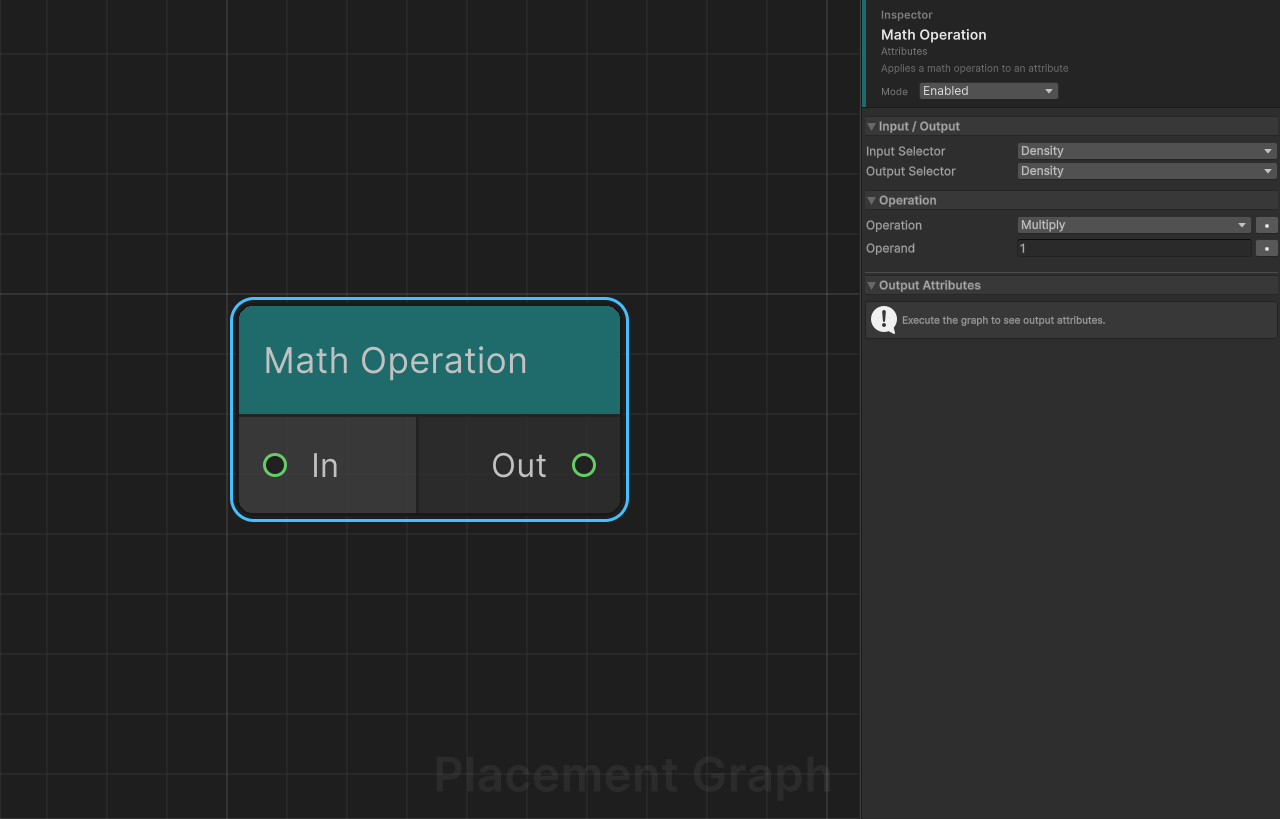
Category: Attributes
Description: Applies a single math function to an attribute value, optionally using a constant operand, and writes the result to an output attribute.
Ports
| Direction | Name | Type |
|---|---|---|
| Input | In | Point |
| Output | Out | Point |
Settings
Input / Output
| Field | Type | Default | Description |
|---|---|---|---|
inputSelector | PPGAttributeSelector | Density | Attribute to read the input value from. |
outputSelector | PPGAttributeSelector | Density | Attribute to write the result to (Write mode selector). |
Operation
| Field | Type | Default | Description |
|---|---|---|---|
operation | MathOp | Multiply | The mathematical function to apply. See operation table below. |
operand | float | 1.0 | Right-hand operand for binary operations. Ignored by unary operations. |
Available Operations
| Operation | Formula / Description | Uses Operand |
|---|---|---|
Add | value + operand | Yes |
Subtract | value - operand | Yes |
Multiply | value * operand | Yes |
Divide | value / operand (returns 0 when operand is 0) | Yes |
Power | pow(value, operand) | Yes |
Min | min(value, operand) | Yes |
Max | max(value, operand) | Yes |
Abs | abs(value) | No |
Floor | floor(value) | No |
Ceil | ceil(value) | No |
Round | round(value) | No |
OneMinus | 1 - value | No |
Sqrt | sqrt(abs(value)) | No |
Modulo | value % operand (returns 0 when operand is 0) | Yes |
Frac | Fractional part of value | No |
Sign | -1, 0, or 1 depending on sign of value | No |
Lerp | lerp(0, operand, value) | Yes |
InverseLerp | saturate(value / operand) (returns 0 when operand is 0) | Yes |
Smoothstep | smoothstep(0, operand, value) | Yes |
Remap01 | saturate(value / operand) (same as InverseLerp) | Yes |
Length | Vector magnitude of multi-component attribute; abs(value) for scalar | No |
LengthSq | Squared vector magnitude; value * value for scalar | No |
Negate | -value | No |
Saturate | clamp(value, 0, 1) | No |
Log | Natural log (clamped to EPSILON) | No |
Log2 | Base-2 log (clamped to EPSILON) | No |
Log10 | Base-10 log (clamped to EPSILON) | No |
Exp | e^value | No |
Exp2 | 2^value | No |
Provided / Consumed Attributes
- Provides: If
outputSelectoris a custom attribute, declares it asFloat(IPPGAttributeProvider). - Consumes: If
inputSelectoris a custom attribute, declares it as consumed (IPPGAttributeConsumer).
Tips
LengthandLengthSqautomatically read the full vector wheninputSelectortargets a multi-component attribute (Float2/Float3/Float4) without a component sub-index.- The output selector may be the same as the input selector for in-place modification.
DivideandModulosilently return0instead of throwing on division by zero.