Appearance
Spline Nodes
Spline nodes work with Unity Spline data. Some nodes sample a Spline into Point data (Spline Sampler), while others build a Spline from Point data (Create Spline from Points). All nodes in this category use the purple node color (#B34DB3).
Spline Sampler
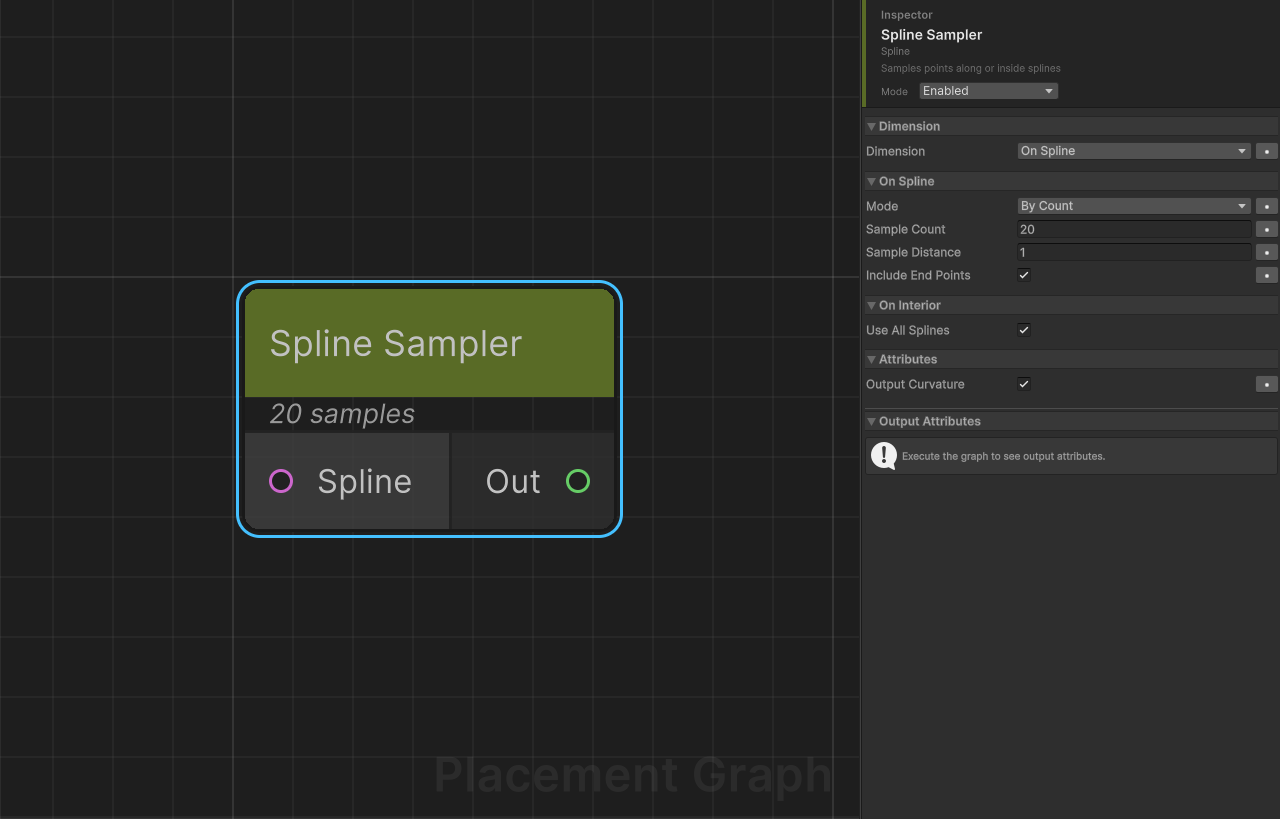
Category: Spline
Description: Samples points along or inside splines and outputs Point data with spline-derived attributes.
The node can operate in two dimensions:
- OnSpline — samples positions along the spline curve itself.
- OnInterior — fills the enclosed area of a closed spline with a regular grid of points (XZ-plane projected).
Ports
| Direction | Name | Type |
|---|---|---|
| Input | Spline | Spline |
| Output | Out | Point |
Settings
Dimension
| Field | Type | Default | Description |
|---|---|---|---|
dimension | SplineSamplerDimension | OnSpline | Whether to place points along the spline curve or fill the closed interior. |
SplineSamplerDimension enum
| Value | Description |
|---|---|
OnSpline | Samples positions directly on the spline curve at regular count or distance intervals. |
OnInterior | Grid-scans the XZ bounding box of a closed spline and keeps only points inside the polygon. Requires a closed spline. |
On Spline
| Field | Type | Default | Description |
|---|---|---|---|
mode | SampleMode | ByCount | How sample positions are determined. See SampleMode enum below. |
sampleCount | int | 20 | Number of evenly-spaced samples. Used when mode = ByCount. Minimum is 2. |
sampleDistance | float | 1.0 | World-space distance between samples. Used when mode = ByDistance. Minimum is 0.001. |
includeEndPoints | bool | true | When mode = ByDistance, guarantees the spline end point (t = 1) is always included. |
SampleMode enum
| Value | Description |
|---|---|
ByCount | Divides the normalised spline parameter [0, 1] into sampleCount - 1 equal steps. |
ByDistance | Steps along the spline in world-space increments of sampleDistance. |
On Interior
| Field | Type | Default | Description |
|---|---|---|---|
interiorSpacing | float | 1.0 | XZ grid cell spacing in world units. Smaller values create denser point clouds. Minimum is 0.01. |
densityFalloff | bool | false | When enabled, reduces point density near the spline boundary using a linear falloff. |
falloffDistance | float | 2.0 | World-space distance from the boundary over which density falls to zero. Only effective when densityFalloff is enabled. |
Spline Filtering
| Field | Type | Default | Description |
|---|---|---|---|
useAllSplines | bool | true | Process all splines in the input SplineContainer. Disable to filter by index. |
splineMask | int | ~0 | Bitmask controlling which spline indices are processed when useAllSplines is false. Each bit corresponds to one spline index (bit 0 = spline 0, etc.). Hidden in the inspector. |
Attributes
| Field | Type | Default | Description |
|---|---|---|---|
outputCurvature | bool | true | Compute and store spline curvature at each sample point as the SplineCurvature attribute. |
Provided Attributes
The following metadata attributes are always written to every output point:
| Attribute Name | Type | Description |
|---|---|---|
SplineAlpha | float | Normalised spline parameter t in the range [0, 1]. 0 = spline start, 1 = spline end. |
SplineDistance | float | World-space arc-length distance from the spline start, in units. Computed as t × splineLength. |
SplineCurvature | float | Curvature magnitude at the sample point. Only written when outputCurvature is enabled. |
SplineBorderDistance | float | Minimum world-space distance from the point to the spline boundary polygon. OnInterior only. |
All four are declared through IPPGAttributeProvider.
Point Transform
Every sampled point receives:
- Position: The spline position converted from world space into the
PPGComponent's local space. - Rotation: A look-rotation built from the spline tangent and up vectors at the sample position. Interior points use the tangent/up of the nearest spline boundary point.
- Scale:
(1, 1, 1)(unit scale). - Density:
1.0for OnSpline points. For OnInterior points,1.0unlessdensityFalloffis enabled, in which case the value linearly decays to0withinfalloffDistanceof the boundary.
Tips
- The interior polygon is approximated with 64 line segments; highly irregular splines may produce minor sampling artefacts near concave regions.
- Curvature is computed using finite differences (
h = 0.001) on the spline parameter. Very short splines or near-zero tangents may produce0. - Each spline in the input container produces a separate
PPGPointDataoutput batch. Downstream filter nodes see each batch independently. - OnInterior requires a closed spline. If the spline is open, a warning is logged and the spline is skipped.
- To sample only specific splines from a multi-spline
SplineContainer, disableuseAllSplinesand set thesplineMaskbitmask via script or a custom editor.
Create Spline from Points
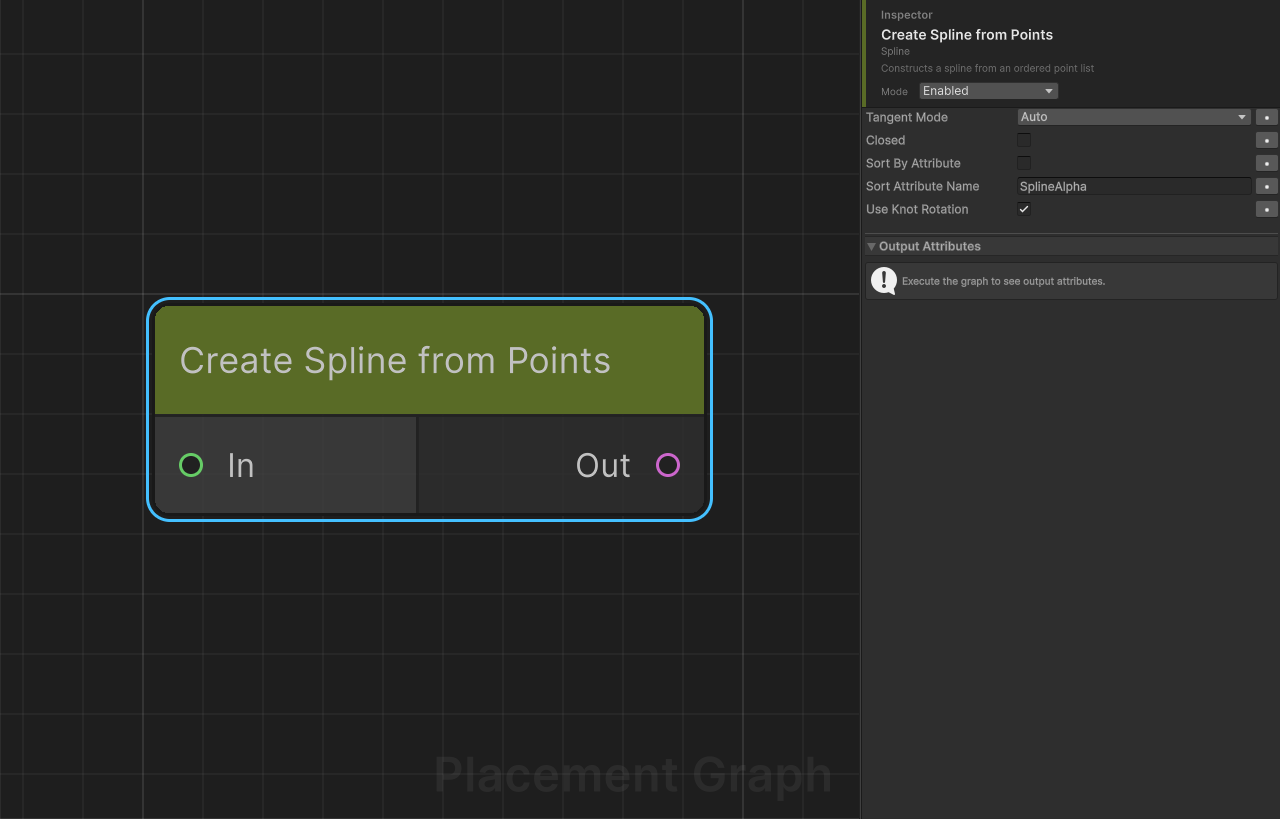
Category: Spline Description: Constructs a world-space Spline from an ordered list of Point data. Bridges the Point world (samplers, procedural point sources, point-op nodes) back into the Spline world so the result can feed Spline Mesh Deformer, Spline Sampler, Filter By Spline, or any other Spline-consuming node.
The canonical use case is terrain conforming splines: sample an authored spline, project the sampled points onto a terrain via Project To Surface, then reconstruct a spline that follows the terrain surface.
Ports
| Direction | Name | Type |
|---|---|---|
| Input | In | Point |
| Output | Out | Spline |
Settings
| Field | Type | Default | Description |
|---|---|---|---|
tangentMode | SplineTangentMode | Auto | Tangent mode applied to all knots of the output spline. |
closed | bool | false | Create a closed loop spline. |
sortByAttribute | bool | false | Sort input points by a float attribute before using them as knots. Useful when upstream nodes (filters, sorters) have disturbed the original order. |
sortAttributeName | string | "SplineAlpha" | Attribute name used for sorting when sortByAttribute is enabled. SplineAlpha is produced by Spline Sampler, so the default works for the common Sampler → ... → CreateSpline flow. |
useKnotRotation | bool | true | Use each point's rotation as the knot rotation. Disable to fall back to quaternion.identity. |
SplineTangentMode enum
| Value | Description |
|---|---|
Auto | Alias for AutoSmooth. Tangents are computed automatically for smooth curves through the knots. |
Linear | Straight-line segments between knots. Each knot becomes a sharp corner. |
AutoSmooth | Same as Auto; listed explicitly for clarity. |
Behavior
- Each input
PPGPointDatabecomes one outputPPGSplineData(1:1 per-group mapping, matchingSpline Sampler's output pattern). - Input points must be in component-local space; the node converts each to world space via the component's transform (consistent with every other spline producer in the package).
- Knot positions, tangents (left as zero —
AutoSmooth/Linearcompute them automatically), and rotations are written; the spline is then fed back through the graph as world-space data. - Groups with fewer than two usable knots are skipped with a warning. When
sortByAttributeis on but the attribute is missing, the node falls back to array order with a single warning.
Example: Terrain-conforming Road
Get Binding (SplineContainer)
  └─▶ Spline Sampler (ByCount = 16)
        └─▶ Project To Surface (Terrain)
              └─▶ Create Spline from Points
                    └─▶ Spline Mesh Deformer
The road mesh from the Deformer follows the terrain surface because the driving spline's knots were projected onto it.
Tips
- Input point count is the output spline's knot count. For smooth curves, 12–32 knots are typically enough; more does not always help because
AutoSmoothadds curvature between knots. - If a filter or sort node reorders points between
Spline SamplerandCreate Spline from Points, enablesortByAttributewithSplineAlphaso the original spline traversal order is restored before knot construction. - For procedural point sources (Poisson Disk, Grid, Manual Placement) that lack
SplineAlpha, leavesortByAttributedisabled — the array order is used directly.